Month-end close and automation
Invoicing automation
At work I automated our month-end invoicing with Power Query and Python, and it went from about 125 hours a month to about 5. This is a rebuild on made-up data. The workbook pulls the general ledger and labor costs, builds every invoice and ties each one back to the ledger before it goes out.
Monthly invoicing used to take about 125 hours. I didn't automate the old process; I redesigned it: one general ledger export, one central staffing file, and a Power Query and Python pipeline that builds every invoice and checks it against the ledger before it goes out. It now takes about 5 hours. A separate C# tool I wrote turned about 30 hours a month of file-by-file PDF exports into one five-minute run.
The March close
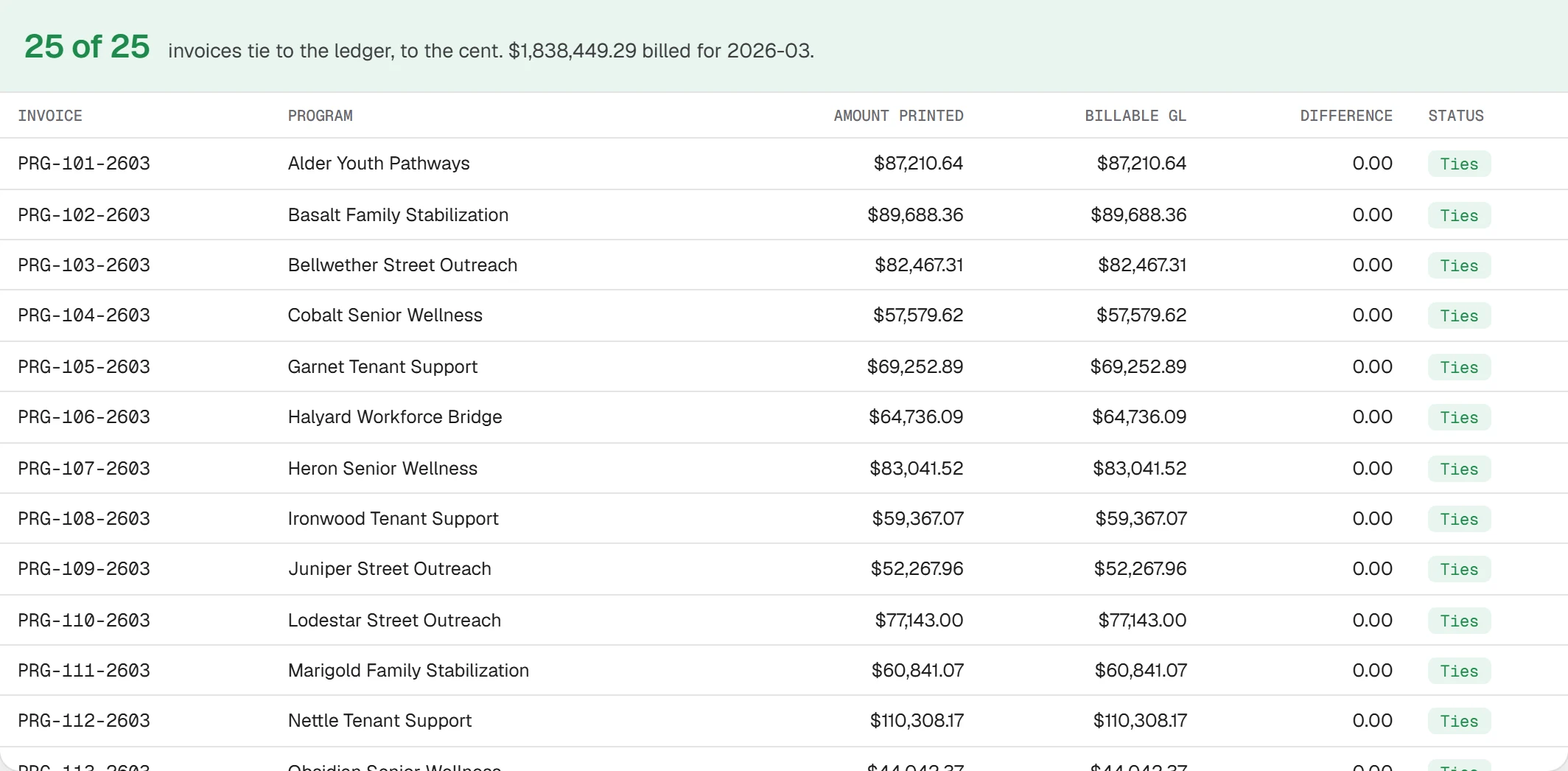
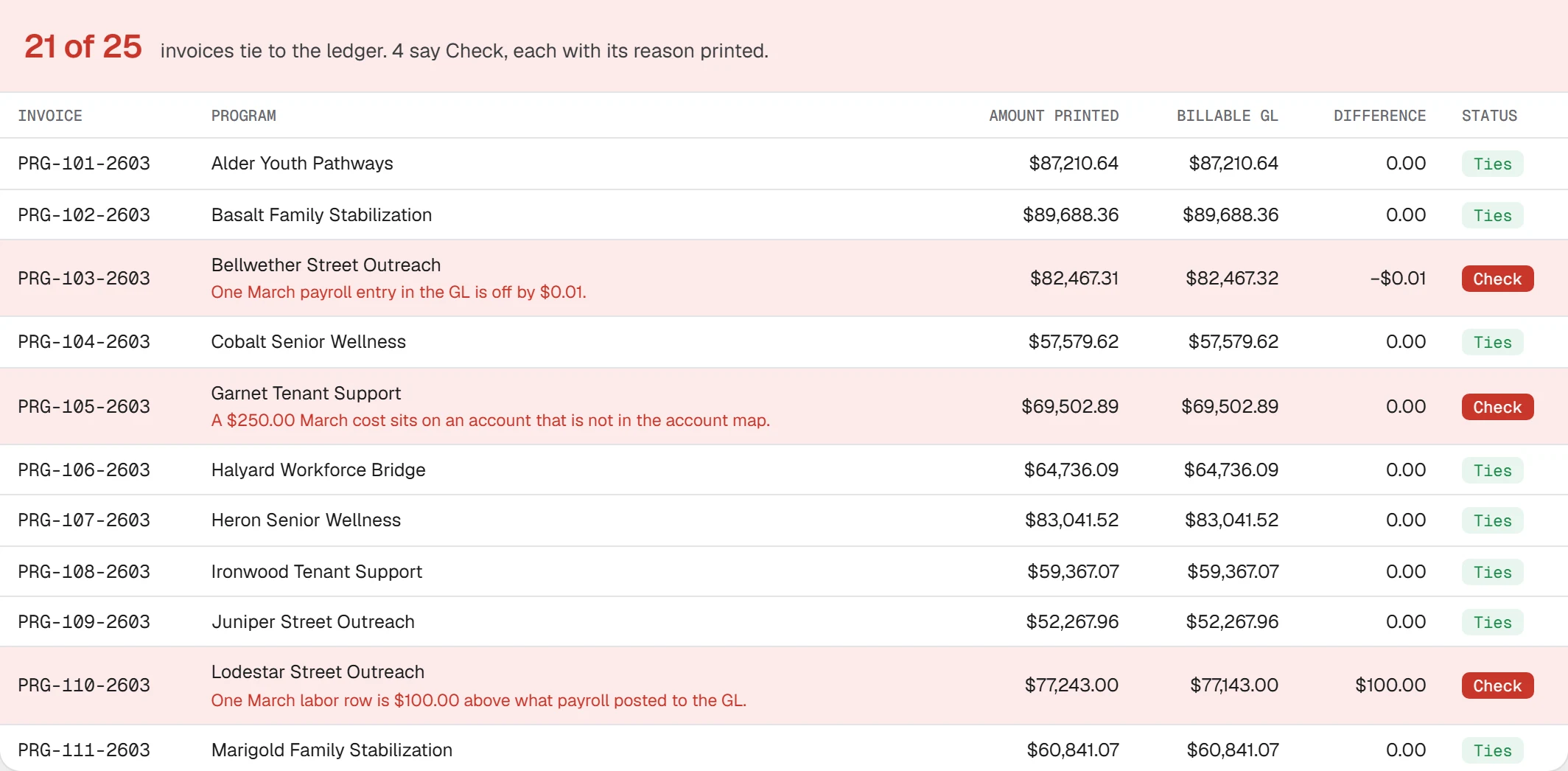
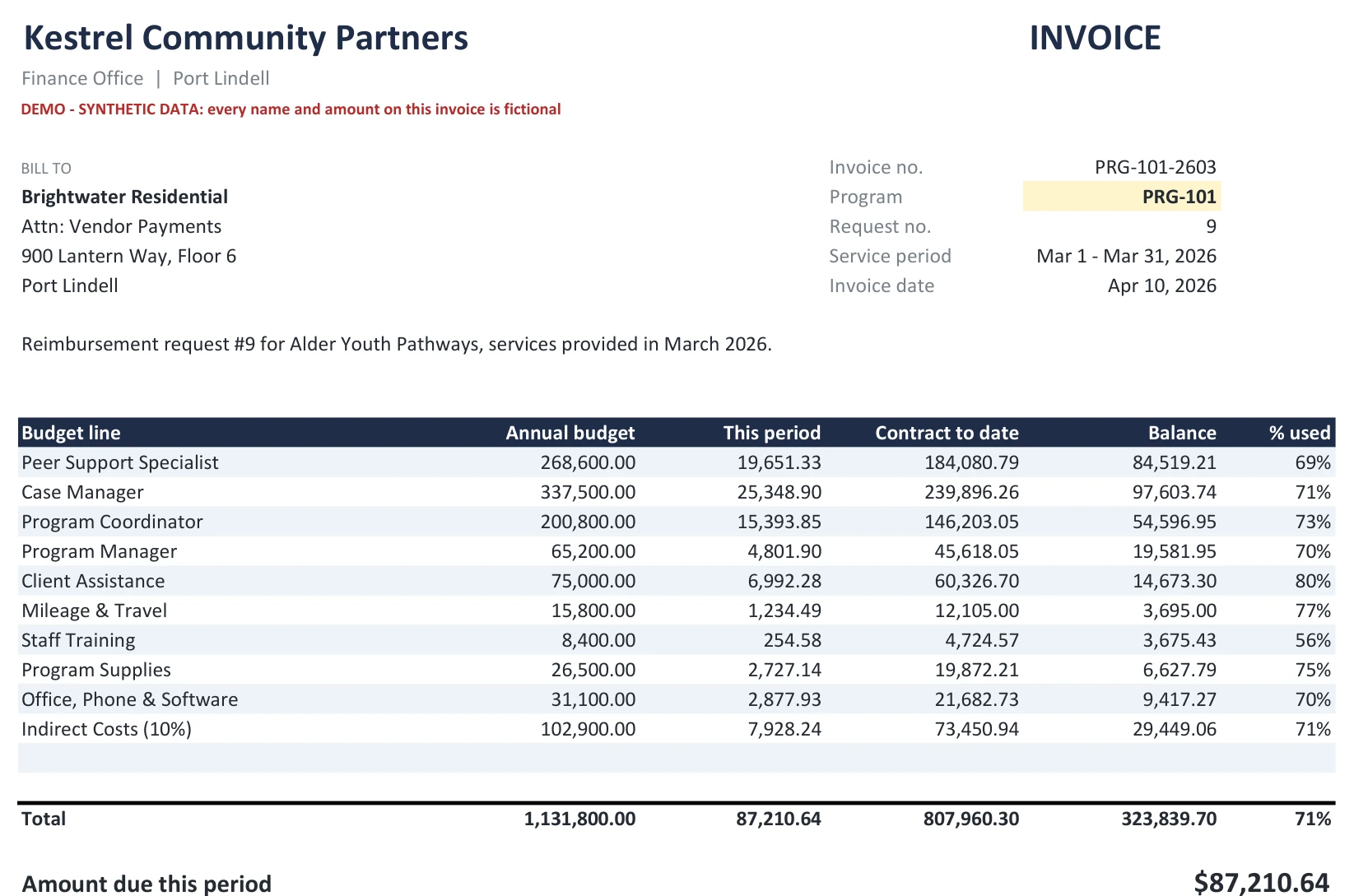
The demo workbook bills $1,838,449.29 for March, across 25 invoices and 75 pages. Press Refresh all to run the month, then Break it to plant four errors.
Every program had its own workbook, rebuilt by hand each month: paste the GL export, fill the account down, delete the accruals, check the formula ranges still cover the paste. This one has 194 formulas.
This month the paste ran to row 24. The SUMIFS ranges stop at row 20, so 4 rows are never counted. Nothing in the book compares its total with the ledger.
- Invoice from the book
- $95,085.29
- Billable cost in the ledger
- $110,308.17
- Under-billed
- $15,222.88
- Copy last month's workbook, rename it for the new month
- Run the GL report filtered to this program and this month; export it
- Paste the export into the GL tab as values
- Fill the account name down beside every transaction by hand
- Find and delete accrual and reversal rows by hand
- Run the hours report for this program; paste it into the Hours tab
- Check the SUMIFS ranges on Expenses and Labor by position still cover the paste
- Type the new month into Periods!J3; check the request number and period
- Copy last month's 'this period' column into PriorMonths as values
- Compare the invoice total with the GL: the book has no formula that does it
- Hide the working tabs, print the invoice pages to PDF
- Save and file it; repeat for the next program
How it was built. An AI agent system I run produced it from my design of the process I run at work, I went through it myself, and a separate check re-derives its figures from the source files.

The full analysis
Each part opens on click.
The control gapWhy a short invoice looked exactly like a correct one
Nothing in the old process compared the invoice with billable cost in the ledger. Each program had its own book, rebuilt by hand every month: paste the GL export, fill the account down, delete the accruals, check the formula ranges still cover the paste. In the demo, one month's paste outgrows the book's formulas and $15,222.88 never gets billed. The file is downloadable as manual-invoice-before.xlsx.
The redesignStandardize the inputs, and one set of queries serves every program
Standardize upstream before writing any logic
The GL report is exported under one fixed file name. Labor cost comes from one central export, not a report per program.
One set of queries
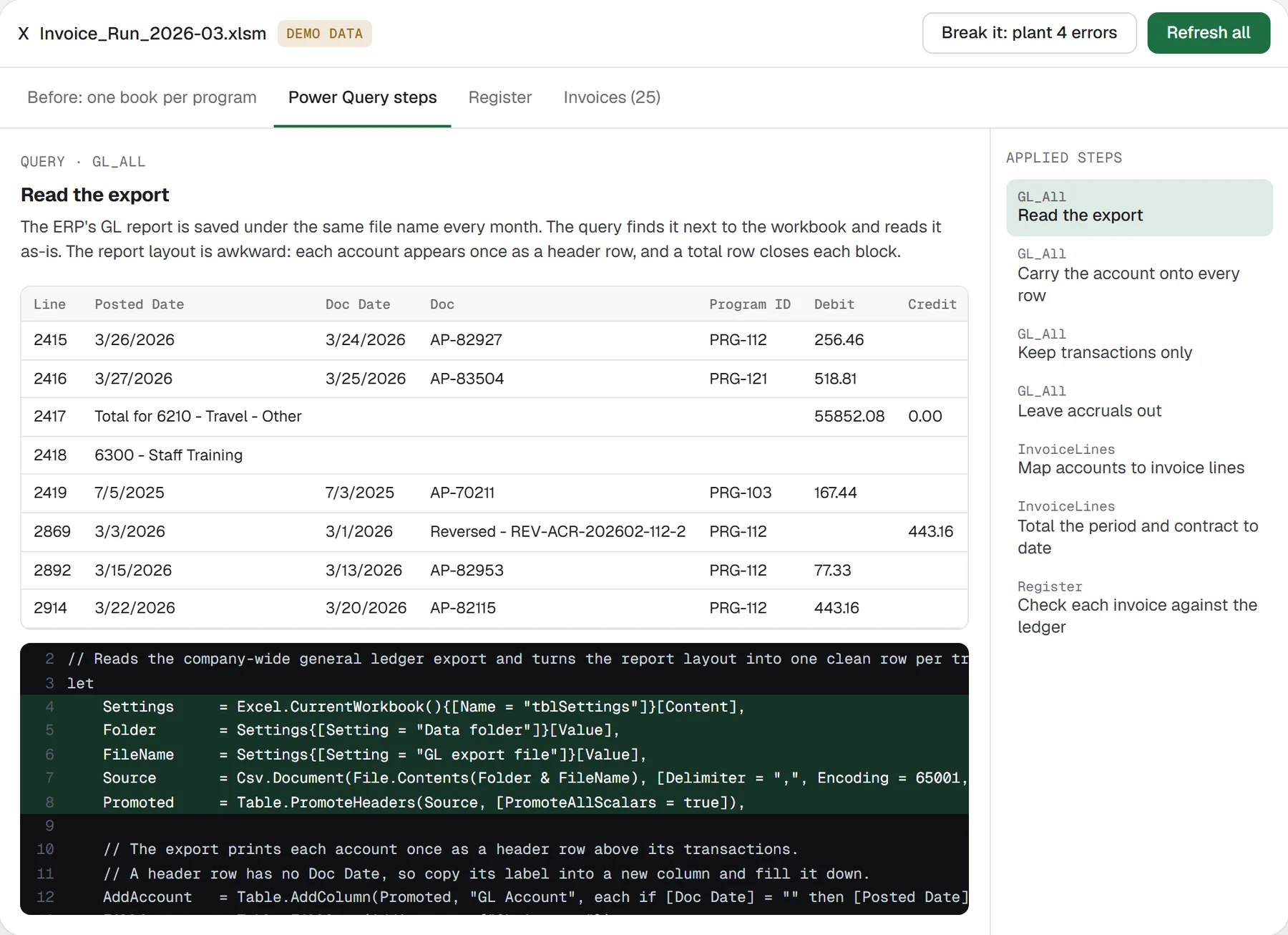
Five Power Query queries read both exports and build the invoice lines: fill the account down, drop report furniture, exclude accruals and reversals, map accounts to invoice lines, total this period and contract to date, join the budget. At work the same queries sit inside the program workbooks that use it, one click per invoice; this demo puts the 25 in one workbook so one refresh shows the month.
People own three small tables
Programs, budgets, and an account-to-line map. The map is the one place contract terms differ: a row can name one program and wins over the shared row (in the demo, one county contract bills client transit as its own line).
The Register says what is wrong
For each invoice: the amount printed vs billable GL (completeness: it also catches cost that never reached the page), the labor export vs payroll posted to the GL (a second source), and two counts: lines with no budget, and lines past the invoice template's rows (counted from the template itself, not typed). Any of them off and the status is Check. The printed invoice carries the same four lines under Amount due.
ControlsWhat prints under the amount due, and what happens when one fails
Under the amount due, every invoice prints its checks: it ties to billable GL, labor ties to payroll, every budget line is printed, and no spend sits on a line with no budget. An approver sees them without opening Excel. When one fails, the invoice says so next to the amount due: PRG-110's says “No: $100.00 difference”, so it is fixed before it is sent.
The refresh runs these steps: read the export, carry the account onto every row, keep transactions only, leave accruals out, map accounts to invoice lines, total the period and contract to date, check each invoice against the ledger.
What it was tested againstAccruals, a change in the export format, another folder and month
Accruals and reversals
the March export carries 13 reversals netting −$13,613.98 (demo); the query leaves them off.
A change in the export format
from January reversals are written in a new format. A starts-with filter would let 43 rows and $61,300.54 of credits onto invoices (demo); matching REV- anywhere in the Doc field does not.
Another folder, another month
unzipped to a new path and refreshed, 25 of 25 match an independent pandas recalculation to the cent (demo); with February's exports dropped in under the same names, 25 of 25 again.
At work
Monthly invoicing went from about 125 hours to about 5, with automated reconciliation that catches discrepancies before they reach reporting. A separate C# tool turned about 30 hours a month of manual, file-by-file PDF exports into one batch run of about 5 minutes.
Limits and next
Cost-reimbursement billing only. The demo ledger has no misposted program codes or mid-month rate changes. The invoice template prints 12 lines; a longer contract is flagged, not continued on a second page.
Next: flag any line whose month runs above 1.5× its monthly budget before it is billed; feed the register into the budget-vs-actual and forecast dashboard the day the GL closes; keep budget revisions with history.
Files
Demo - synthetic data. Every organization, program, person and amount is fictional. The backup pages need Excel for Microsoft 365 or 2021.